Rinse the coffee spouts after 200 coffees
Use water-only coffee delivery to rinse the spouts with about 0.5 litre, then record the coffee count and observed flow.
Version 2.0.0. Required observations are marked *. Your answers stay in this browser.
1. Match the model and parts
With the machine cool, empty and unplugged, check the underside nameplate for EC685 or EC685 EX:4. Compare the frother and tabbed filter with the linked manual. The support page is on a US domain but its download is English International. Use the manual supplied for your regional appliance; no US voltage or electrical compatibility is inferred.
Region: English International manual 57132C8997_01_0626; regional nameplate must match
Parts: Three buttons, steam dial, removable frother and tabbed perforated filter as pictured in this manual
Not covered: EC680; Dedica Arte EC885; Maestro EC950; Modified steam wand; Different filter design; Regional instructions that differ from this manual.
Choose the versions you can confirm.
Compare versions →2. Prepare
Stop for a damaged cord, burning smell, liquid leaking from the appliance body, all lights flashing while the machine does not work, or a holder that remains hot or pressurized. Disconnect when safe and contact De’Longhi Customer Services. Keep the casing, boiler and internal steam circuit closed.
Consumables and fit
| Item | Specification & fit | Do not substitute |
|---|---|---|
| Fresh clean water | Fill the tank no higher than MAX. EC685 / EC685 EX:4 matching this manual. | Do not operate with an empty tank or with the tank removed.p6 §2 |
3. Follow your checks
Match the model and preparation to start.
Read all possible routes
Is the appliance undamaged, with delivery stopped and parts cool and unplugged for any hands-on work?
- Yes — Keep hands clear of outlets during the specific powered water or steam steps below.
- No — Stop for a damaged cord, burning smell, liquid leaking from the appliance body, all lights flashing while the machine does not work, or a holder that remains hot or pressurized. Disconnect when safe and contact De’Longhi Customer Services. Keep the casing, boiler and internal steam circuit closed.
- Not sure — Save a preparation record and compare the matching manual before continuing.
Does your EC685 or EC685 EX:4 match English International manual 57132C8997_01_0626, including the three buttons, original frother and tabbed filter?
- Yes — Continue only with the controls and parts pictured in this manual.
- No — Find the manual supplied for your region and component version. This guide cannot confirm a different version.
- Not sure — Save a preparation record and compare the matching manual before continuing.
Is normal water delivery available, without a fault, body leak or incomplete descale?
- Yes — This is the routine coffee-spout rinse.
- No — Use the no-coffee check or finish descaling before attempting a routine rinse.
- Not sure — Save a preparation record and compare the matching manual before continuing.
Are the original filter and holder clean, with no ground coffee or pod inside?
- Yes — Use the normal coffee button to deliver rinse water.
- No — Clean and empty the filter first; this rinse uses water only.
- Not sure — Save a preparation record and compare the matching manual before continuing.
4. Follow and record
Complete the checks before recording physical work. Follow steps in order.
Record the rinse trigger
Record whether 200 coffees have been made since the previous spout rinse, or whether you are establishing a new maintenance baseline because the count is unknown.
Look for: The manufacturer’s trigger is 200 coffees; an earlier baseline rinse is your own maintenance choice.
Manual: p10 §11.3Prepare water and the empty holder
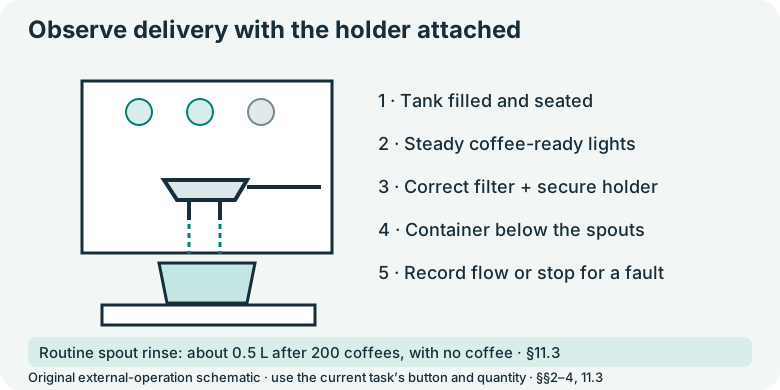
On the cool unplugged appliance, check the clean filter and insert. Leave out ground coffee and pods, attach the holder normally, fill the tank with fresh water up to MAX and seat it gently.
Look for: The holder is empty and the tank contains enough water for the rinse.
Manual: p7 §4.2; p6 §2; p10 §11.3Place the measuring container
Put the container under the holder spouts before powering on. Wait for the steady coffee-ready lights.
Look for: The container captures hot water without requiring hands under the spouts.
Manual: p7 §§4–4.2Deliver about half a litre
Use the normal coffee button without ground coffee, repeating delivery as needed to collect about 0.5 litre in total. Watch the measure and tank level; stop for absent flow or leakage. Keep the holder attached during delivery.
Look for: About 0.5 litre has passed through the coffee outlet; the machine has not been run dry.
Manual: p10 §11.3; p6 §2; p7 §4Stop and dispose of hot rinse water safely
Wait for delivery to stop before moving the collection container. Allow hot water to cool enough to handle safely and empty it. Refill the tank as needed, staying below MAX.
Look for: The outlet area and tray are in their normal positions; no active discharge is handled.
Manual: p7 §4; p6 §2; p10 §11.1Save the baseline and flow result
Record the date and whether the water flow was normal. Start a new coffee count for the next 200-coffee interval. Refer continued poor or absent flow to the matching troubleshooting task.
Look for: The next interval is based on coffees made rather than an invented weekly schedule.
Manual: p10 §11.3; p13 §14
5. Keep your result
Record what you observed. A completed checklist does not certify that equipment is repaired.
When to check again
After every 200 coffees.
Rinse the coffee spouts with about 0.5 litre of water after every 200 coffees. Track coffee count from the recorded rinse.
Manufacturer guidance · p10 §11.3Sources & fit
- De’Longhi EC685 / EC685 EX:4 instructions (57132C8997_01_0626)p10 §11.3; p7 §4.2; p6 §2 · Checked 2026-10-13
- Dedica Style EC685.TB EX:4 support centerEC685.TB EX:4 → English (International) → Instructions for use, 57132C8997_01_0626 · Checked 2026-10-13
Independent, AI-assisted guidance. No physical repair trial is claimed. Manufacturer instructions for your exact version take priority.