Check very slow coffee delivery
Separate a dirty filter or due spout rinse from overfilling, overly firm tamping and unsuitable grounds.
Version 2.0.0. Required observations are marked *. Your answers stay in this browser.
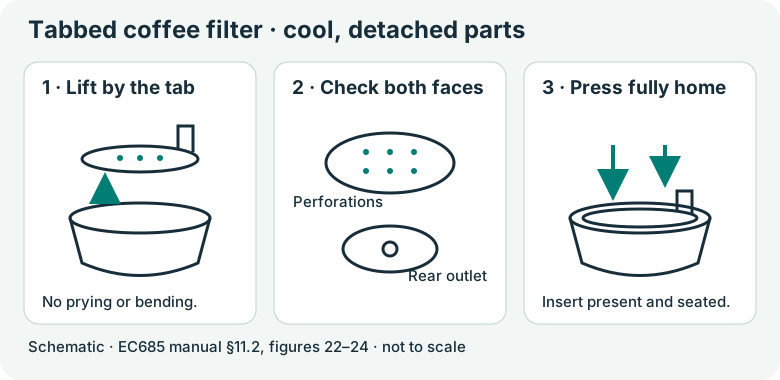
1. Match the model and parts
With the machine cool, empty and unplugged, check the underside nameplate for EC685 or EC685 EX:4. Compare the frother and tabbed filter with the linked manual. The support page is on a US domain but its download is English International. Use the manual supplied for your regional appliance; no US voltage or electrical compatibility is inferred.
Region: English International manual 57132C8997_01_0626; regional nameplate must match
Parts: Three buttons, steam dial, removable frother and tabbed perforated filter as pictured in this manual
Not covered: EC680; Dedica Arte EC885; Maestro EC950; Modified steam wand; Different filter design; Regional instructions that differ from this manual.
Choose the versions you can confirm.
Compare versions →2. Prepare
Stop for a damaged cord, burning smell, liquid leaking from the appliance body, all lights flashing while the machine does not work, or a holder that remains hot or pressurized. Disconnect when safe and contact De’Longhi Customer Services. Keep the casing, boiler and internal steam circuit closed.
Consumables and fit
| Item | Specification & fit | Do not substitute |
|---|---|---|
| Ground coffee for espresso machines | Choose the correct one- or two-cup filter and a suitable dose; no universal gram dose is specified here. Original ground-coffee filters C2 / C3. | Coffee for other brewing methods, excessively damp grounds or an overfilled basket.pp6–7 §4; p13 §14 |
| Fresh clean water | Fill the tank no higher than MAX. EC685 / EC685 EX:4 matching this manual. | Do not operate with an empty tank or with the tank removed.p6 §2 |
3. Follow your checks
Match the model and preparation to start.
Read all possible routes
Is the appliance undamaged, with delivery stopped and parts cool and unplugged for any hands-on work?
- Yes — Keep hands clear of outlets during the specific powered water or steam steps below.
- No — Stop for a damaged cord, burning smell, liquid leaking from the appliance body, all lights flashing while the machine does not work, or a holder that remains hot or pressurized. Disconnect when safe and contact De’Longhi Customer Services. Keep the casing, boiler and internal steam circuit closed.
- Not sure — Save a preparation record and compare the matching manual before continuing.
Does your EC685 or EC685 EX:4 match English International manual 57132C8997_01_0626, including the three buttons, original frother and tabbed filter?
- Yes — Continue only with the controls and parts pictured in this manual.
- No — Find the manual supplied for your region and component version. This guide cannot confirm a different version.
- Not sure — Save a preparation record and compare the matching manual before continuing.
Is coffee delivered slowly, without a body leak, all-lights fault or completely absent delivery?
- Yes — Check removable coffee parts and preparation.
- No — For no delivery use Check when no coffee comes out. A body leak or all-lights fault requires support.
- Not sure — Save a preparation record and compare the matching manual before continuing.
Can you inspect the cooled original filter and identify whether the coffee-spout rinse is due?
- Yes — Complete any needed cleaning before the comparison brew.
- No — Let the holder cool and compare the correct filter and maintenance history first.
- Not sure — Save a preparation record and compare the matching manual before continuing.
4. Follow and record
Complete the checks before recording physical work. Follow steps in order.
Record the slow-brew condition
Stop delivery, allow the holder to cool and unplug before hands-on inspection. Record whether the filter has visible residue and whether the dose appears overfilled.
Look for: These are observed starting conditions, not a diagnosis of an internal pump.
Manual: p13 §14; p10 §11Restore the filter openings
If the filter or holder spout holes are dirty, complete Clean the coffee filters. Check the perforated insert is present and fully seated before the next brew.
Look for: The removable filter path is visibly clear and correctly assembled.
Manual: p10 §11.2; p13 §14Review spout maintenance
Check the coffee count since the last spout rinse. If 200 coffees have been made, use Rinse the coffee spouts for the about-0.5-litre water delivery. If normal water delivery is absent, stop and use the no-coffee check instead.
Look for: The spout rinse is completed if due, or recorded as not due; an absent flow is not repeatedly forced.
Manual: p10 §11.3; p13 §14Change the relevant preparation
For the comparison brew, reduce an excessive dose or overly firm tamping and use coffee intended for espresso machines. Replace excessively fine or damp grounds. Keep the same correct one- or two-cup filter so you can describe what changed.
Look for: Record the actual preparation change; do not claim an exact universal dose or pressure.
Manual: pp6–7 §4; p13 §14Observe one normal brew
Reassemble, wait for steady coffee-ready lights and brew into a cup using the normal coffee button. Keep the holder attached throughout delivery.
Look for: Record whether the flow improved, stayed slow or became absent.
Manual: p7 §4; p13 §14Route a persistent symptom
If slow delivery remains, save the result. Limescale is another manual-listed cause; follow the complete indicated descaling path or contact Customer Services. No internal adjustment is included.
Look for: A continued symptom stays visible in the record instead of being marked repaired.
Manual: p13 §14; pp10–11 §12
5. Keep your result
Record what you observed. A completed checklist does not certify that equipment is repaired.
When to check again
Coffee is delivered very slowly.
Repeat the check if this symptom returns. Any reminder date is your own plan; the manual gives no scheduled interval for this check.
Your care plan · p13 §14Sources & fit
- De’Longhi EC685 / EC685 EX:4 instructions (57132C8997_01_0626)p13 §14: dark froth / slow delivery; p10 §§11.2–11.3; pp6–7 §4 · Checked 2026-10-13
- Dedica Style EC685.TB EX:4 support centerEC685.TB EX:4 → English (International) → Instructions for use, 57132C8997_01_0626 · Checked 2026-10-13
Independent, AI-assisted guidance. No physical repair trial is claimed. Manufacturer instructions for your exact version take priority.