Cool the EC685 coffee circuit after steam
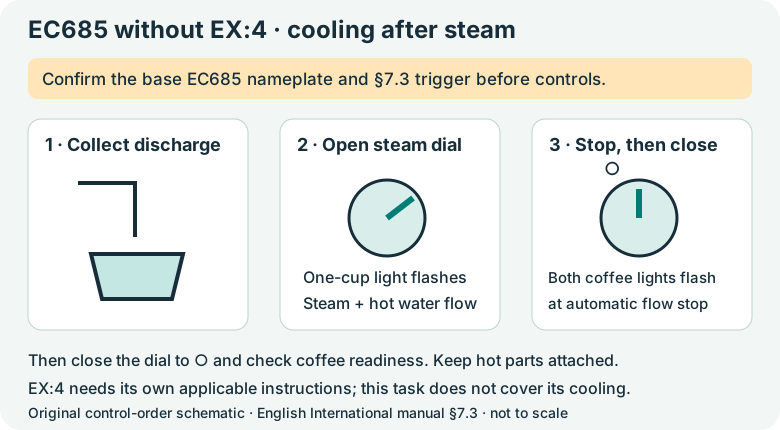
For EC685 without EX:4 only: follow the documented cooling cycle when both coffee lights flash together after steaming.
Version 2.0.0. Required observations are marked *. Your answers stay in this browser.
1. Match the model and parts
Only EC685 without EX:4. Section 7.3 does not assign this cooling procedure to EC685 EX:4. With the machine cool, empty and unplugged, check the underside nameplate for EC685 or EC685 EX:4. Compare the frother and tabbed filter with the linked manual. The support page is on a US domain but its download is English International. Use the manual supplied for your regional appliance; no US voltage or electrical compatibility is inferred.
Region: English International manual 57132C8997_01_0626; regional nameplate must match
Parts: Three buttons, steam dial, removable frother and tabbed perforated filter as pictured in this manual
Only EC685 without EX:4. Section 7.3 does not assign this cooling procedure to EC685 EX:4.
Not covered: EC680; Dedica Arte EC885; Maestro EC950; Modified steam wand; Different filter design; Regional instructions that differ from this manual; EC685 EX:4 / EC685 EX4 cooling sequence.
Choose the versions you can confirm.
Compare versions →2. Prepare
Stop for a damaged cord, burning smell, liquid leaking from the appliance body, all lights flashing while the machine does not work, or a holder that remains hot or pressurized. Disconnect when safe and contact De’Longhi Customer Services. Keep the casing, boiler and internal steam circuit closed.
Consumables and fit
| Item | Specification & fit | Do not substitute |
|---|---|---|
| Fresh clean water | Fill the tank no higher than MAX. EC685 / EC685 EX:4 matching this manual. | Do not operate with an empty tank or with the tank removed.p6 §2 |
3. Follow your checks
Match the model and preparation to start.
Read all possible routes
Is the appliance undamaged, with delivery stopped and parts cool and unplugged for any hands-on work?
- Yes — Keep hands clear of outlets during the specific powered water or steam steps below.
- No — Stop for a damaged cord, burning smell, liquid leaking from the appliance body, all lights flashing while the machine does not work, or a holder that remains hot or pressurized. Disconnect when safe and contact De’Longhi Customer Services. Keep the casing, boiler and internal steam circuit closed.
- Not sure — Save a preparation record and compare the matching manual before continuing.
Does your EC685 or EC685 EX:4 match English International manual 57132C8997_01_0626, including the three buttons, original frother and tabbed filter?
- Yes — Continue only with the controls and parts pictured in this manual.
- No — Find the manual supplied for your region and component version. This guide cannot confirm a different version.
- Not sure — Save a preparation record and compare the matching manual before continuing.
Does your confirmed nameplate say EC685 without EX:4, matching the model scope of §7.3?
- Yes — Continue only for this base EC685 cooling instruction.
- No — EC685 EX:4 is excluded from this task. Use its matching regional instructions or Customer Services.
- Not sure — Save a preparation record and compare the matching manual before continuing.
After steam use and exit from steam mode, do both coffee-button lights flash together as in §7.3?
- Yes — Use the cooling cycle with a container beneath the frother.
- No — Identify the current indication in §13; do not run this cycle for unrelated flashing or all lights flashing.
- Not sure — Save a preparation record and compare the matching manual before continuing.
4. Follow and record
Complete the checks before recording physical work. Follow steps in order.
Record the exact version and indication
Use the nameplate identification already made while the appliance was cool. Confirm EC685 without EX:4 and record that both coffee-button lights are flashing after steam use. Leave the hot frother and holder attached.
Look for: The version and trigger both match §7.3 before any control is changed.
Manual: p8 §7.3; p6 §1Prepare the water and collection path
Check there is water in the tank and put a stable heat-resistant container under the fully assembled frother. Keep hands and face away from the dispenser.
Look for: The container will collect both steam and hot water without holding it under the outlet.
Manual: p8 §7.3 first point; p6 §2Open the steam dial for cooling
Open the dial to the steam/hot-water position. Allow steam and hot water to discharge into the container. The one-cup light flashes during this cooling delivery.
Look for: The expected discharge and one-cup indication are observed; do not remove the frother or holder.
Manual: p8 §7.3 second pointWait for the documented end state
Wait until discharge stops automatically and the one-cup and two-cup lights flash, as §7.3 describes for completion of cooling. If delivery or indications do not match, close the dial and seek manual or service guidance instead of repeatedly restarting.
Look for: Automatic stop and the two coffee-light indication occur together.
Manual: p8 §7.3 third pointClose the dial
Turn the steam dial back to ○. Confirm coffee readiness before the next normal coffee. Move the collection container only after discharge has stopped and it can be handled safely.
Look for: The dial is closed and the cooling sequence is complete.
Manual: p8 §7.3 third point; p12 §13Keep milk cleaning separate
Complete the after-milk frother-cleaning task once it is safe to purge, switch off and cool the removable parts. If the coffee lights still will not show readiness, save the remaining indication for support.
Look for: Cooling the circuit and cleaning milk residue are both addressed by their specific instructions.
Manual: p8 §§7.2–7.3
5. Keep your result
Record what you observed. A completed checklist does not certify that equipment is repaired.
When to check again
On the base EC685, both coffee lights flash together after steam and the circuit needs cooling.
Perform the §7.3 cooling cycle only for its stated version and indication; no calendar interval is specified.
Manufacturer guidance · p8 §7.3Sources & fit
- De’Longhi EC685 / EC685 EX:4 instructions (57132C8997_01_0626)p8 §7.3: only EC685, EC695, EC785; p8 §7 exit-steam note; p12 §13 · Checked 2026-10-13
- Dedica Style EC685.TB EX:4 support centerEC685.TB EX:4 → English (International) → Instructions for use, 57132C8997_01_0626 · Checked 2026-10-13
Independent, AI-assisted guidance. No physical repair trial is claimed. Manufacturer instructions for your exact version take priority.