Read lights during use
Interpret a light pattern seen while vacuuming and choose recharge or support using the during-use diagram.
Version 2.0.0. Required observations are marked *. Your answers stay in this browser.
1. Match the model and parts
Read SV10 on the machine label and compare your parts with manual 229602-01. Filter A has a small pinch handle; Filter B twists off the rear. A star-shaped top is a different version. Confirm the dry motorized head in this manual before following a brush task.
Region: US
Parts: Pinch-handle Filter A and twist-off Filter B; original dry motorized head
Not covered: V8 star pre-filter; V8 Cyclone; Soft roller / Fluffy head cleaning; V10 / V11; Modified batteries or aftermarket heads.
Choose the versions you can confirm.
Compare versions →2. Prepare
Stop for a damaged charger, burning smell, liquid exposure, a swollen or leaking battery, broken catches or an obstruction you cannot safely reach. Contact Dyson and keep the battery sealed.
Consumables and fit
| Item | Specification & fit | Do not substitute |
|---|---|---|
| Existing Dyson-specified charger | Match the charger to the exact machine through Dyson support; no universal voltage or part number is inferred. US SV10 machine and its specified charger | Damaged, substitute or modified chargers; opening or probing a chargerp11 Diagnostics – lights during charging; p12 Charging and storage; Battery safety instructions |
3. Follow your checks
Match the model and preparation to start.
Read all possible routes
Is the charger disconnected, the machine cool and undamaged, and your hand away from the trigger?
- Yes — Continue with the matching parts and the checks below.
- No — Stop for a damaged charger, burning smell, liquid exposure, a swollen or leaking battery, broken catches or an obstruction you cannot safely reach. Contact Dyson and keep the battery sealed.
- Not sure — Save your observations and compare the matching manual before continuing.
Was the observed light on the machine during use, with the charger disconnected?
- Yes — Use the during-use meanings below.
- No — Use Read charging fault lights for a pattern seen while charging.
- Not sure — Save your observations and compare the matching manual before continuing.
Which color was seen during use?
- Blue — Record the number and whether it was solid or flashing.
- Red, solid or flashing — A flashing red light indicates a battery fault; solid red indicates a main-body fault in this manual. Contact Dyson with the exact pattern.
- Unclear or another pattern — Save the observation and compare the exact manual diagram; do not guess.
4. Follow and record
Complete the checks before recording physical work. Follow steps in order.
Keep the observation in context
Leave the machine stopped while recording the light you saw. Do not repeatedly trigger it just to reproduce a fault. Record that the charger was disconnected.
Look for: Charging lights must be interpreted in the separate charging task.
Manual: p11 Diagnostics – lights during use; OperationMatch steady blue lights
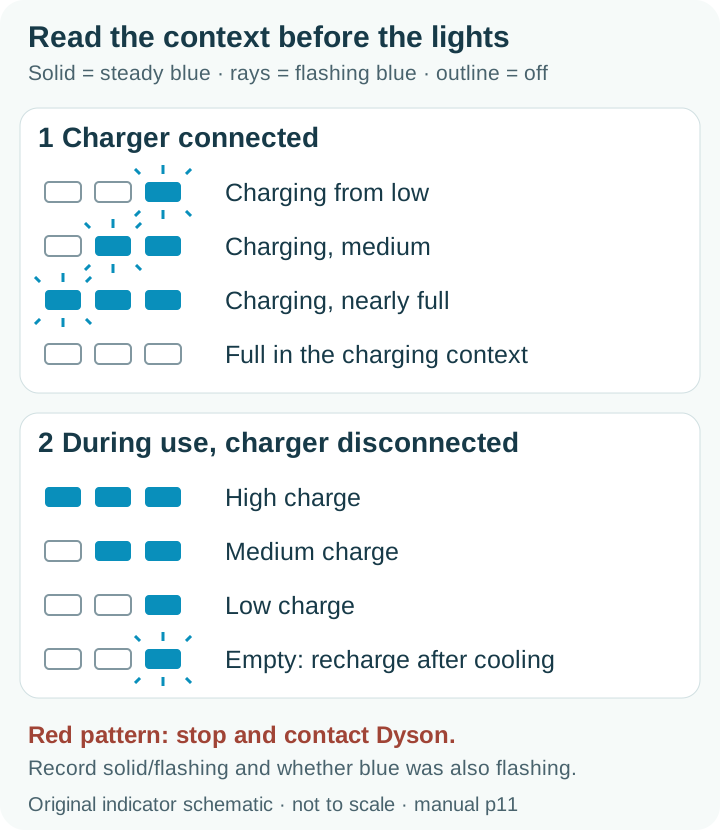
Three solid blue lights mean high charge; two mean medium; one means low. These are charge-level indications during use.
Look for: The number of solid blue lights is not a motor fault code.
Manual: p11 Diagnostics – lights during use; OperationMatch flashing blue
One flashing blue light during use means the battery is empty and needs recharging. Record steady or flashing along with the number of lights.
Look for: A flashing light is different from one steady low-charge light.
Manual: p11 Diagnostics – lights during use; OperationChoose the next action
For flashing blue, recharge with the correct Dyson charger after the machine has cooled following full discharge. For steady blue with a separate symptom, choose the relevant weak-pickup, brush or pulsing task.
Look for: Blue lights alone do not prove the cause of a suction or brush complaint.
Manual: p11 Diagnostics – lights during use; Operation; p11 Diagnostics – lights during charging; p12 Charging and storage; Battery safety instructionsSave a useful support record
Keep the context, pattern and associated symptom together. If a red light or unsafe symptom appears, stop using the machine and contact Dyson; keep the battery and main body closed.
Look for: A manufacturer referral uses the exact observed pattern, not a guessed replacement part.
Manual: p11 Diagnostics – lights during use; Operation
5. Keep your result
Record what you observed. A completed checklist does not certify that equipment is repaired.
When to check again
A light was observed while using the machine, especially before it stopped.
As needed for this condition. No fixed calendar interval is specified for this check; choose your own review date if useful.
Your care plan · p11 Diagnostics – lights during use; OperationSources & fit
- Dyson V8 SV10 operating manual, pinch filter (229602-01)p11 Diagnostics – lights during use; Operation · Checked 2026-10-13
- Choose your Dyson V8 support: star or pinch filterV8 support selector: pinch handle versus star filter · Checked 2026-10-13
Independent, AI-assisted guidance. No physical repair trial is claimed. Manufacturer instructions for your exact version take priority.