Store spare cutting line correctly
Keep spare compatible nylon from drying out using the manual’s sealed-bag method, away from the assembled tool and battery.
Version 2.0.0. Required observations are marked *. Your answers stay in this browser.
1. Match the model and parts
Remove the battery. Find LST300 and the adjacent type number on the tool label. Compare the guard, cap, spool and assembly figures with the linked LST300 manual. Use ServiceNet for your exact type if they differ. LST300 is not a bump-feed head.
Region: US
Parts: Automatic-feed head with AF-100 spool; match model and tool type to manual
Not covered: LST420 / LSTE525; GH corded models; Dual-line heads; Metal line or blades; Nonmatching tool type or modified head; Unknown tool type or missing exact-type manual; Bump-feed conversion.
Choose the versions you can confirm.
Compare versions →2. Prepare
Keep the battery removed if the exact type/manual match is unknown or parts differ from the figures. Stop for a damaged battery, exposed wiring, a faulty switch, cracked guard, broken spool/hub, damaged cap tabs or housing slots. Use an authorized service center. Never open the battery, motor housing or charger.
Consumables and fit
| Item | Specification & fit | Do not substitute |
|---|---|---|
| Bulk cutting line | 0.065 inch (1.65 mm) round nylon monofilament Intact original AF-100 spool with the slot, adjacent anchor hole, arrow and fill recesses in figs P–R | Serrated, square, heavier or metal line; different anchor geometryEnglish p10 Rewinding spool from bulk line; figs P–R |
| Factory-wound replacement spool | BLACK+DECKER AF-100; 0.065 inch (1.65 mm) round nylon monofilament Original LST300 automatic single-line head, after exact tool-type/manual match | Bump-feed or dual-line heads; metal, serrated or heavier line; unverified replacement headsEnglish p9 Cutting line / Line feeding; Replacement accessories |
| Spare-line storage bag | Sealable plastic bag with one tablespoon of water Spare prewound spools or bulk line only | Assembled trimmer, battery, charger or any electrical componentEnglish p10 Maintenance item 2 |
3. Follow your checks
Match the model and preparation to start.
Read all possible routes
Is the battery removed, the trigger released and the cutting head stopped, with no battery damage, exposed wiring or faulty switch?
- Yes — Keep the battery removed for every hands-on step.
- No — Stop using the tool for electrical, battery or switch damage. If you have only omitted battery removal, make the tool safe before restarting.
- Not sure — Keep the battery removed. Save your preparation record and check the matching manual before continuing.
Have you matched the label LST300 AND its exact tool type to the official lookup manual and its figures, with the original AF-100 automatic single-line head?
- Yes — Record the label type and matching manual reference in the first step.
- No — An unknown type, unavailable type manual, different figures, bump-feed head or dual-line conversion blocks this procedure. Use manufacturer support to identify the correct instructions.
- Not sure — Keep the battery removed. Save your preparation record and check the matching manual before continuing.
Are you storing loose spare line or an unfitted spare spool, separate from the tool, battery and charger?
- Yes — Only spare nylon supplies belong in this method.
- No — Remove spare supplies from electrical equipment; do not apply this water treatment to the assembled tool.
- Not sure — Keep the battery removed. Save your preparation record and check the matching manual before continuing.
Is the spare line verified as compatible round nylon and is the bag clean and sealable?
- Yes — Use the manual’s one-tablespoon bag method.
- No — Check line specifications and prepare a suitable bag first.
- Not sure — Keep the battery removed. Save your preparation record and check the matching manual before continuing.
4. Follow and record
Complete the checks before recording physical work. Follow steps in order.
Record the exact tool and make it safe
Release the trigger, let the head stop, engage the lock-off and remove the battery. Leave it removed throughout hands-on care. Keep fingers away from the sharp cutter on the guard. Read LST300 and the tool type from the label. Open the official model/type lookup and compare its manual and parts figures with your actual guard, single-line head and AF-100 spool. A readable model name alone does not establish the type. If the exact type manual cannot be obtained, or any figure differs, save a preparation record and stop.
Look for: The battery is physically separate from the tool; your label type and matching manual reference are written below.
Manual: Official model/type lookup instructions; type is beside or below the model numberIdentify and separate the spare supply
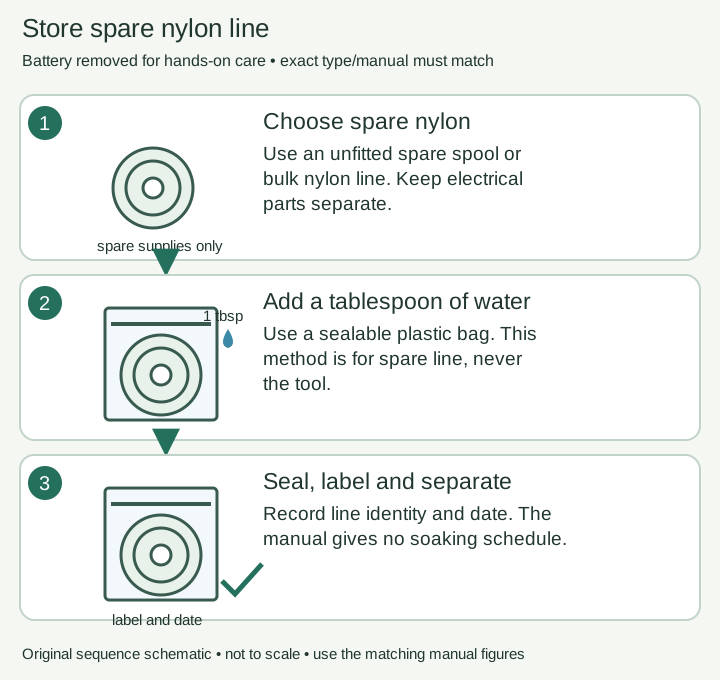
Read the AF-100 or bulk-line marking. Put the compatible spare spool or bulk line on a clean surface away from the trimmer, removed battery and charger. Keep the product label for later identification.
Look for: Only spare nylon supplies are being prepared; no electrical equipment will enter the bag.
Manual: English p10 Maintenance item 2Prepare a sealable bag
Use a clean plastic bag that can be sealed around the spare supplies. Keep the line identity readable on a label outside the bag so it cannot be confused with heavier or differently shaped line.
Look for: The storage bag closes and the line specification can still be identified.
Manual: English p10 Maintenance item 2Add the manual’s water amount
Place the spare prewound spool or bulk line in the bag and add one tablespoon of water, as the maintenance section specifies to prevent line drying. Keep all water away from the tool, battery and charger.
Look for: The measured tablespoon is in the spare-line bag; this is not an instruction to wet the head or motor.
Manual: English p10 Maintenance item 2Seal and store the supplies
Seal the bag and keep it separate from electrical equipment in the storage area. The manual gives no soaking duration or recurring water-addition schedule; do not invent either.
Look for: The bag remains sealed and separate from the battery and charger.
Manual: English p10 Maintenance item 2Record the stored part
Record the line marking, bag location and preparation date. When the line is needed, check its specification again and follow the spool-fitting or winding task. Keep bag water out of the tool during handling.
Look for: The saved record makes the correct spare supply easy to identify later.
Manual: English p10 Maintenance item 2
5. Keep your result
Record what you observed. A completed checklist does not certify that equipment is repaired.
When to check again
Spare nylon line is being stored
Use the bag method for spare supplies. No soaking time or replenishment interval is specified.
Manufacturer guidance · English p10 Maintenance item 2Sources & fit
- BLACK+DECKER LST300 instruction manual (manufacturer document, retailer-hosted)English p10 Maintenance item 2 · Checked 2026-10-13
- BLACK+DECKER: locate a manual using model and type numberOfficial model/type lookup instructions; type is beside or below the model number · Checked 2026-10-13
- BLACK+DECKER LST300 product and supportLST300 model identity; Automatic Feed Spool; Includes AF-100 · Checked 2026-10-13
Independent, AI-assisted guidance. No physical repair trial is claimed. Manufacturer instructions for your exact version take priority.